Allods Developers Community

This is a sample guest message. Register a free account today to become a member! Once signed in, you'll be able to participate on this site by adding your own topics and posts, as well as connect with other members through your own private inbox!

[Guide] Allods 1.1.02.0 Server Setup on Windows

Yes, I found the console, but what exactly should I write?

CREATE USER 'allods_online'@'localhost';

GRANT ALL PRIVILEGES ON . TO 'allods_online'@'localhost' WITH GRANT OPTION;

FLUSH PRIVILEGES;


You enter those 3 sql command in your mysql command prompt ;)
 
Uhm , first remove the space of your path , its avoid to have some issue : C:\allods 1.0\server\
and second try :

CREATE USER ''@'localhost';

GRANT ALL PRIVILEGES ON . TO ''@'localhost' WITH GRANT OPTION;

FLUSH PRIVILEGES;


xd i dont promise that it will works
 
Could you elaborate on that at all? Finally got everything up and running and would love to make it lan accessible for my wife to join in.
Nevermind, after plenty of digging through .class files, working a few things out, and revisiting this forum to see what was off, I discovered this:

<config name="AOSRV" comment="" build="Debug" serversNeed="1" maxUsers="5000">
That config name line makes all the difference, as apparently it checks if something is named "*_local" and forces the 127.0.0.1 IP address rule.
Otherwise it seems to happily accept whatever.
Got mine working over my lan now, happily.
 
it didn't help but thanks anyway)

Hey there Community,

first of all big thanks for all the Guides and Fixes and Helps. After a terrible long time, beginner me got everything up and running. Also thanks to google.

I had the same problem as you nikizrya and maybe someone else has too. So here is how it works:

Do all steps as fido described and enter in MySQL the following:

CREATE USER 'allods_online'@'localhost';

GRANT ALL PRIVILEGES ON * . * TO 'allods_online'@'localhost' WITH GRANT OPTION;

FLUSH PRIVILEGES;

Beware that you enter * . * without the spaces. If you write it without spaces (as fido did here) you may get the bold function of the text, so it seems no stars are there. This combo is a reference to your database.

Other way: Go to your phpMyAdmin->User->chose user "allods_online" with host "localhost" and change rights/privileges. You can then manually change to "ALL PRIVILEGES" and "GRANT"-Option "yes". After you apply, it will show you the correct code on the top of the website. (but it will overwrite you privileges to nullify them).
So you can copy the line that says "GRANT ALL PRIVILEGES ON * . * TO 'allods_online'@'localhost' WITH GRANT OPTION;"
into your WAMP MySQL Console and it should work fine, with no danger of any typos.
After that FLUSH PRIVILEGES; to save the settings, reload phpMyAdmin and voila.

I hope this helps someone and is not too obvious :)
 
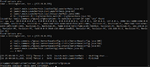
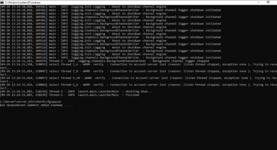
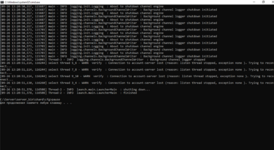
Hello, a year ago I managed to install a virtualization, but alas the hard disk was lost during the move
So I sit down to do it all over again, I remember it was easy. Yeah, not easy. Help me, please.

If its important I tried different amount of memory 1,2,3,4,5gb

XML:
<?xml version="1.0" encoding="utf-8"?>
<config name="test_trunk_shard" build="Debug" serversNeed="1" mapServicesAmount="1">
  <net basePort="9000" datagramPort="8000" bindPortsRange="15"/>
  <logging args="logging.channels.local.LocalChannelEngineFactory --defaultlogpath --logpath=/local/temp --format=CSV --start"/>

  <accountServer maxUsersOnShard="1000" clientsLimit="50" build="builds/standard.xml" versionOnLogin="-1" memory="500" ip="127.0.0.1">
    <approve ip="127.0.0.1" port="9318"/>
    <auth ip="127.0.0.1" port="9317" timeout="300000"/>
    <api protocol="http" host="127.0.0.1" port="9337"/>
    <db host="127.0.0.1" user="postgres" password="1234" config="accountserverdb-config-pgsql.properties"/>
  </accountServer>
</config>

XML:
<?xml version="1.0" encoding="utf-8"?>
<config>
  <resourceSystem restrictedMapsLoading="true" checkResourceSystemIndex="false"/>

  <masterServer memory="1024" ip="127.0.0.1">
    <db host="127.0.0.1" user="root" password="" config="masterserverdb-config-trunk.properties"/>
    <net ip="127.0.0.1" port="9500"/>
    <api ip="127.0.0.1" port="10500"/>
  </masterServer>
</config>

XML:
<?xml version="1.0" encoding="utf-8"?>
<config name="trunk_local" comment="" build="Debug" serversNeed="1" maxUsers="5000">
  <net basePort="10000" consoleAccessPort="9856"/>
  <resourceSystem storeXdbLinks="true" useInternalization="true"/>

  <content territory="USA" pack="Base"/>

  <logging kind="local">
    <local format="csv"/>
    <remote host="localhost" port="8888"/>
  </logging>

  <shard role="LocalShard" memory="" ip="127.0.0.1">
    <frontEnd externalHost="127.0.0.1" ip="127.0.0.1" port="9322" timeout="60000"/>
    <db host="127.0.0.1" user="allods_online" password="" config="db/database-config-trunk.properties"/>
    <auction host="127.0.0.1" user="allods_online" password="" db="db/auctiondb-config-trunk.properties"/>
    <mail host="127.0.0.1" user="allods_online" password="" db="db/maildb-config.properties"/>
    <guild host="127.0.0.1" user="allods_online" password="" db="db/guilddb-config.properties"/>
    <http host="127.0.0.1" port="82"/>
    <indicator/>
    <doorway/>
  </shard>

  <itemMallServer>
    <net ip="127.0.0.1" port="9321" reconnect-timeout="30"/>
  </itemMallServer>

  <accountServer maxUsersOnShard="1000" build="builds/standard.xml">
    <approve ip="127.0.0.1" port="9318"/>
    <auth ip="127.0.0.1" port="9317" timeout="30000"/>
    <api protocol="http" host="127.0.0.1" port="9337"/>
  </accountServer>

  <masterServer>
    <net ip="127.0.0.1" port="9500"/>
    <api ip="127.0.0.1" port="10500"/>
  </masterServer>

  <billingServer>
    <net port="9320" host="127.0.0.1"/>
    <api port="8080" host="-1"/>
  </billingServer>

  <resourceErrorsEnabled>false</resourceErrorsEnabled>

  <gameMechanics>
    <characterCreation allowDiffFactions="true"/>
    <character levelCap="42"/>
    <shipRate build="1" buildReduce="1"/>
    <mobExpRate>1</mobExpRate>
    <questExpRate>1</questExpRate>
  </gameMechanics>

  <!-- use fake address of gametool - 127.0.0.2 - to avoid same ip as local shard -->
  <gametoolEAR ip="127.0.0.2" lang="rus">
    <standard-gametool-config>
      <mode name="single"/>
      <instance name="Trunk shard"/>
      <database-defaults>
        <default-gametool-database port="5432" database="gametool" login="gametool" password="gametool"/>
        <default-logserver-database host="127.0.0.1" port="5432" database="logserver" login="logserver" password="logserver"/>
      </database-defaults>
      <master address="127.0.0.1" login="*" password="*"/>
      <shard id="trunk_local" name="trunk_local" address="127.0.0.1"
             login="*" password="*"/>
    </standard-gametool-config>
  </gametoolEAR>

</config>

XML:
<?xml version="1.0" encoding="utf-8"?>
<config name="cbt_local" build="Debug" serversNeed="8" mapServicesAmount="1">

  <logging kind="local">
    <local format="csv"/>
  </logging>

  <billingServer ip="127.0.0.1">
    <net port="9320" host="127.0.0.1"/>
    <api port="8080" host="127.0.0.1"/>
    <db host="127.0.0.1" user="allods_online" password="" config="billingdb-config-trunk.properties"/>
  </billingServer>
</config>


XML:
<?xml version="1.0" encoding="utf-8"?>
<config name="cbt_local" build="Debug" serversNeed="8" mapServicesAmount="1">
  <net basePort="9000" datagramPort="8000" bindPortsRange="15"/>
  <resourceSystem skipClientResources="true" restrictedMapsLoading="true"/>

  <logging kind="local">
    <local format="csv"/>
  </logging>

  <itemMallServer ip="127.0.0.1">
    <net ip="127.0.0.1" port="9321"/>
    <assortment banners-config="banners.cfg"/>
  </itemMallServer>

  <billingServer>
    <net port="9320" host="127.0.0.1"/>
  </billingServer>
</config>
 

Attachments

  • Снимок экрана 2023-09-26 в 13.24.42.png
    Снимок экрана 2023-09-26 в 13.24.42.png
    1.7 MB · Views: 28
  • Снимок экрана 2023-09-26 в 13.22.13.png
    Снимок экрана 2023-09-26 в 13.22.13.png
    1.7 MB · Views: 29
  • server.log.zip
    server.log.zip
    7.6 KB · Views: 5
Hello, a year ago I managed to install a virtualization, but alas the hard disk was lost during the move
So I sit down to do it all over again, I remember it was easy. Yeah, not easy. Help me, please.

If its important I tried different amount of memory 1,2,3,4,5gb
in log file database errors, check it
 
Hi I guess im a bit late to the party, my stackbuilder gives me an error and i cant download the files, doest this work with the latest postgres18 ?
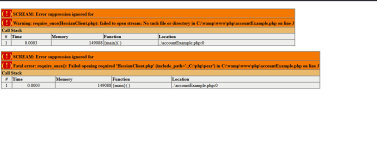
i manually downloaded it, when i start startAccountServer.bat it works as showed, but i cant create the account, when i go to 127.0.0.01/accountExample.php it shows me this:
 

Attachments

  • error.png
    error.png
    28.9 KB · Views: 3
Last edited:
doest this work with the latest postgres18 ?
EN (translated):
PostgreSQL 9.1 is recommended. On a local machine running the latest Ubuntu, it wouldn't start with the PostgreSQL version installed via `sudo` (I don't recall the exact version). It might have been a backward compatibility issue or some other glitch—I didn't feel like investigating. I had to build version 9.1.24 from source using `make`. For Windows, 32 and 64 -bit versions of PostgreSQL 9.2.2-1 are available in the resources section.

The Account Master and Shard components have detailed logs in the `./out` folder, located next to the XML configuration files.

Regarding Hessian: in the original setup, it is located at `./server_bin/server_api` (specifically `./hessian` and `./php`). You can use the universal registration script from version 7.0, as it works with version 1.1. However, you need to adjust the PHP line to match the PostgreSQL database structure, since the variable order differs in version 1.1.

Рекомендуется PostgreSQL 9.1. На локалке с последним ubuntu, с тем PostgreSQL что ставится через sudo (не помню версию) не запускалось. Может обратная совместимость, может другой косяк, лень было разбираться. Пришлось собирать 9.1.24 через make из сорсов. Для Windows PostgreSQL 9.2.2-1 32 и 64 есть в разделе ресурсов.

В acoount master и shard есть точные логи в папке ./out рядом с xml конфигами.

Касательно Hessian он в оригинале в ./server_bin/server_api => ./hessian ./php
Вы можете использовать универсальный скрипт регистрации с 7.0, на 1.1 он работает. Но нужно подкорректировать строчку php со структурой БД PostgreSQL, в 1.1 другой порядок переменных.

Post automatically merged:

Можно еще просто отключить проверку сертификата на уровне сервера, но такое.
Раз ты разобрался в вопросе, в чём я нисколько не сомневаюсь, мог бы более подробно написать как это сделать и чем конкретно это чревато.
Эта информация была бы полезна, как минимум для общего развития. ;)
 
Last edited:
Hi I guess im a bit late to the party, my stackbuilder gives me an error and i cant download the files, doest this work with the latest postgres18 ?
i manually downloaded it, when i start startAccountServer.bat it works as showed, but i cant create the account, when i go to 127.0.0.01/accountExample.php it
You do not have permission to view link Log in or register now.

install with postgres, u dont need stackbuilder
 
Back
Top